What projection mapping does
Projection mapping aligns projected imagery with a physical surface. The surface might be a building, a stage set, an object or part of an exhibition. Instead of treating the projector as a way to display a rectangular film, the design considers the shape and position of the physical environment as part of the image.
The result can suggest movement, reveal layers or change how a familiar object is perceived. In an immersive experience, projection becomes useful when it helps establish a world or directs attention to something meaningful. A visual transformation is most convincing when the narrative explains why the surface is changing and what the visitor should understand from it.
Projection mapping is distinct from interactivity. A mapped sequence can play without responding to visitors. An interactive projection adds an input that affects the imagery or its behaviour. Both can support storytelling, but they require different planning, and a proposal should describe the intended relationship rather than assume the word “projection” implies participation.
- Surface survey
- Content design
- Calibration
- Playback
- Visitor view
- Maintenance
Illustrative design model, not a project floor plan.
Begin with the physical site
The surface is a creative and practical constraint. Its shape, colour, texture and surrounding light affect what visitors can see. A white wall in controlled darkness offers different possibilities from a reflective object in a bright exhibition hall. Evaluate the actual site before choosing the visual style or promising a particular level of detail.
Viewing position matters too. An effect designed for one viewpoint may read differently from the side, and visitors in a group may stand at several angles. Decide whether the experience requires a controlled viewing position or should work across a broader area. The more the story depends on a precise illusion, the more carefully that position needs to be managed.
Build content around the narrative
A projected image can reveal an unseen layer of an object, shift the apparent time of a place or connect separate parts of a set. These are narrative functions, not merely visual effects. Choose a small number of transformations that support the story rather than showing every technique available in a presentation reel.
Think about the relationship between projected and physical detail. If the set already communicates something clearly, the image may enrich it rather than cover it. Contrast between still material and moving light can be effective. Give visitors enough time to understand a change before introducing another, especially when several people are viewing from different positions.
A theatrical reference
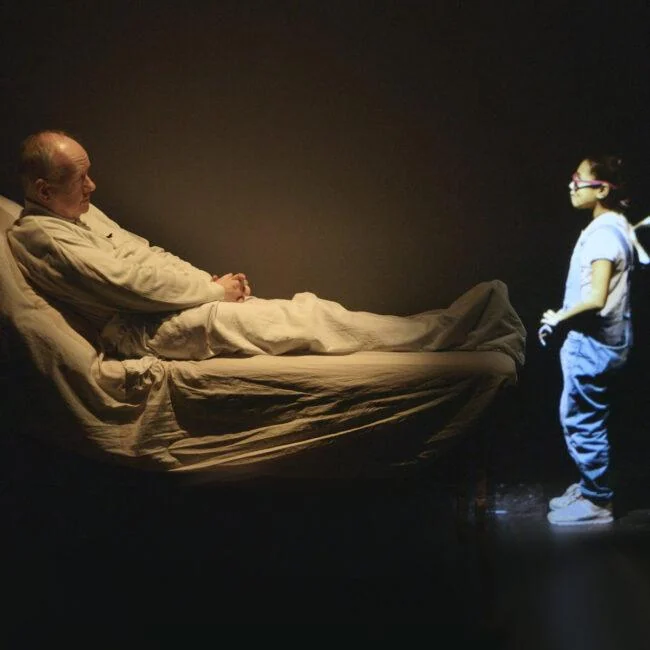
Munchingsquare's portfolio identifies The Fall as a project combining projection mapping with synchronised theatre technology. The featured image shows a projected character within a physical stage setting. It provides a reference for imagery serving a performance environment rather than operating as an isolated screen experience.
For a similar creative brief, ask how projected material relates to performers, objects and timing. Does it establish a place, represent a character or reveal another perspective? These questions can guide production discussions without claiming that a particular technique guarantees an emotional effect. The full project account provides the specific context for this example.
Coordinate image, sound and live action
A projection-led experience often includes several timed elements. Sound, light and live performance may need to align with the image. Establish which system or person controls each transition and how the team recognises a successful cue. A clear plan helps preserve the intended rhythm when the installation runs repeatedly or the performance varies slightly.
Leave room for the practical realities of live work. A performer may take longer to complete an action, or a visitor group may enter at an unexpected moment. Decide which sequences can pause, loop or adapt. A rigid technical schedule can undermine a participatory narrative if it assumes every human action will occur at exactly the same speed.
Know when another medium fits better
Projection is not always the strongest choice. A display may work better where ambient light cannot be controlled. A physical object may communicate a detail more clearly than an image. Sound may establish a presence without requiring people to look in one direction. Compare media according to the visitor experience and the conditions of the site.
Combining media can help, but only when their roles are clear. A physical clue, projected change and audio account might reveal complementary information. If all three deliver the same explanation, the result may become repetitive. Design the relationship between channels rather than treating each additional layer as an automatic improvement.
Plan for repeated operation
An installation needs a repeatable way to start, calibrate and recover. Physical surfaces or equipment positions can change during use, affecting alignment. Consider who checks the system, what conditions count as acceptable and how an issue is communicated. These questions belong in the commissioning brief because reliability shapes what visitors actually experience.
Test the finished content in the real environment with a group. Observe sightlines, legibility and the time people need to interpret a change. A projection that looks impressive on a production monitor may feel different on the intended surface. Successful spatial storytelling brings the image, the place and the visitor's attention into a coherent relationship.
Put this guide into practice
Plan a focused visitor review
Choose one part of the journey that matters to projection mapping. Describe what the visitor should notice, understand or do.
Observe the encounter
Try the encounter with someone unfamiliar with the concept. Record their actions and interpretation before explaining the intended design.
A question for the review
Can the group interpret the image from the intended viewing positions?
Sources & further reading
Practical design suggestions are Youmersive’s editorial guidance. Named projects are attributed to their creators; references do not imply a partnership.