Choose the experience before the device
Virtual reality, augmented reality and mixed reality offer different relationships between digital content and the physical world. Their labels are useful starting points, but they do not fully describe what a visitor will do. Begin with the perspective or action the narrative requires, then consider whether a particular technology makes that experience possible.
Virtual reality commonly places the visitor within a digitally presented environment. Augmented reality adds digital material to a view of physical surroundings. Mixed reality is often used for experiences where digital elements are spatially related to the physical world. Usage varies across platforms, so a proposal should explain the actual visitor behaviour in plain language.
For a group, the key issue is how personal viewpoints connect. A headset can create an intense individual encounter, while making companions less visible. A shared display can support common attention, while offering less personal control. Neither arrangement is inherently better; choose according to the social and narrative relationship the project wants to create.
When VR serves the story
VR can offer access to a place, scale or viewpoint that is difficult to provide physically. A visitor might explore an imagined environment or see a familiar subject from a different position. The medium is most useful when that viewpoint contributes something specific, rather than replacing a physical experience that already serves the purpose well.
Write for the participant's attention. The ability to look around means they may miss an event placed behind them or outside their current focus. Sound, motion and environmental cues can guide attention, but avoid assuming everyone will look in the same direction at the same time. Essential context needs a deliberate delivery plan.
AR and the value of place
Augmented reality can connect a digital layer with an object, location or shared setting. Its narrative value often comes from the relationship between those layers. Showing how a place has changed, revealing an invisible process or adding a character to an existing environment can give visitors a reason to examine the physical world more closely.
A screen can also draw attention away from companions. Design moments when people look up, exchange discoveries or view the same object together. Consider what happens when only some visitors use the device. A shared experience should not depend on every person owning the same hardware unless that requirement is clearly part of the offer.
A mixed reality reference
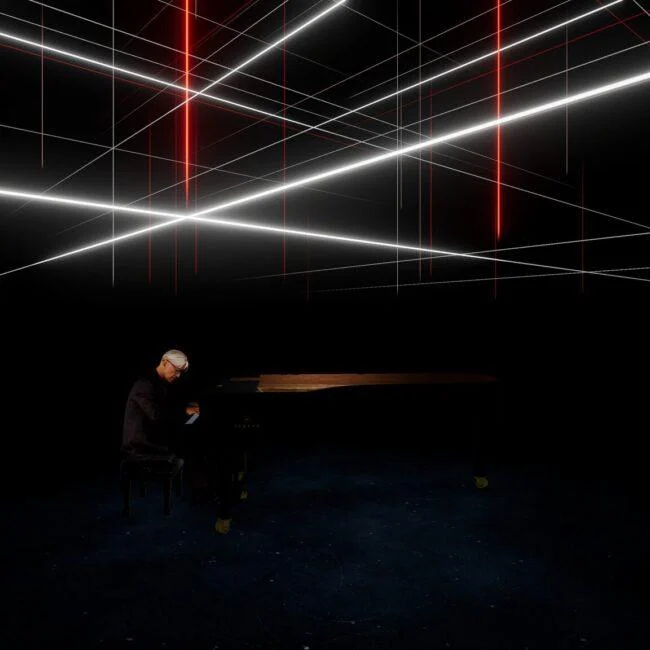
Munchingsquare's portfolio includes KAGAMI, described as a mixed reality concert experience involving Ryuichi Sakamoto. Its project imagery provides a reference for a performance-based approach to immersive technology. The example raises useful questions about the relationship between a personal viewing medium and the social setting of a concert.
Use the official project account for the production's specific details. The broader design lesson is to discuss presence, viewpoint and gathering together, rather than describing XR only through device specifications. A concert, a training simulation and a narrative installation can use related equipment while creating very different experiences.
Design the moments around the headset
A visitor's experience includes fitting equipment, understanding controls and returning to the room afterwards. These transitions affect confidence and pacing. Give people enough support to start, without overwhelming them with instructions unrelated to the first action. Make it clear how to request assistance and how to end the encounter.
For groups, consider what companions do while someone participates. They might see a shared view, explore related material or prepare for a collective discussion. Waiting can become part of the narrative, but it needs a purpose. A queue with no context or visibility of the experience can make the overall visit feel disconnected.
Compare options through practical questions
Ask what equipment is required, how many visitors can participate at once and how each session resets. Consider staff support, cleaning procedures, storage and replacement devices. These practical questions help establish whether the format suits the venue and audience, even before the creative content is fully developed.
Comfort and access vary between visitors. Provide current practical information about the specific experience and equipment, and consider an alternative way to encounter the subject where feasible. Avoid claiming that everyone can use a headset simply because the interaction is technically straightforward. The experience should support informed participation rather than rely on surprise requirements.
Prototype the shared relationship
A prototype should test more than the digital scene. Run the arrival, onboarding, individual encounter and reconnection as a complete sequence. Ask people what they understood, what they felt able to do and how the experience related to their companions. Test with realistic group sizes and session timings.
The strongest XR experience is not necessarily the one with the most advanced device. It is the one where technology enables a clear narrative or experiential purpose and fits the people using it. When the personal viewpoint and shared setting reinforce each other, the equipment becomes part of the storytelling rather than the main subject of the visit.
Put this guide into practice
Plan a focused visitor review
Choose one part of the journey that matters to vr, ar & mixed reality. Describe what the visitor should notice, understand or do.
Observe the encounter
Try the encounter with someone unfamiliar with the concept. Record their actions and interpretation before explaining the intended design.
A question for the review
What connects the personal device experience to the shared gathering?
Sources & further reading
Practical design suggestions are Youmersive’s editorial guidance. Named projects are attributed to their creators; references do not imply a partnership.